Talking Caller ID & SMS
This App is loaded with features.
PHONES KNOWN NOT TO WORK- LGE Optimus ( some versions)- HTC Mecha (Incredible HD)- Huawei M860
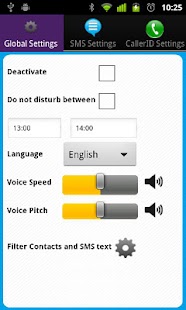
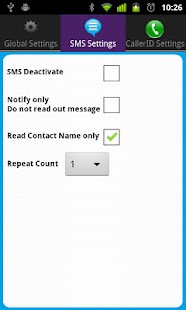
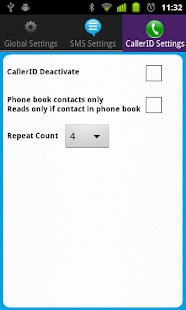
- Phone will read the Sender Name & Full message for you.- Reads in coming callers callerID- Option to enable or disable- Option to set "do not disturb" time period- Option to allow reading SMS immediately or on user click- Select language of your choice to read your SMS- Option to reply to SMS- Speech testing option- Filter Option, Filter by Phone number or SMS Text content- Shake to stop reading.- Honors vibrator mode
***[ IMPORTANT INFORMATION ]****- You must have installed the English "Pico TTS" and the "Pico TTS" for the language configured on your mobile.To check this go to Android Settings -> Voice Input & Output -> Text-to-Speech settings > Pico TTS (Pico TTS settings) and then click on "Install voice data" and install at least the English "Pico TTS", and the "Pico TTS" for the language configured on your mobile
Keywords:Talking Caller ID and SMS Reader
About Talking Caller ID & SMS
- Package name (App ID)
- com.bluehermit.android.talkingplus
- Available on
- Google Play
- Price
- Free
- Version
- v1.2
- Developer
- Ed Kawas
Looking for the Talking Caller ID & SMS APK?
The safest way to get Talking Caller ID & SMS (com.bluehermit.android.talkingplus) on your Android device is to install it directly from Google Play — you'll always get the latest official version, automatic updates, and no risk of modified or infected APK files from third-party sites.
Food & Dining
Discover recipes and order food from your favorite restaurants.
Automotive
Manage and monitor your vehicle with smart features.
Personalization
Customize the app to match your preferences and workflow.
See Talking Caller ID & SMS in Action
Frequently Asked Questions
Is Talking Caller ID & SMS free?
Yes, Talking Caller ID & SMS is free to download and install on Android through Google Play.
How do I install Talking Caller ID & SMS on Android?
Open Google Play on your Android phone or tablet, search for Talking Caller ID & SMS by Ed Kawas or tap the Google Play button on this page, then tap Install. The app downloads and installs automatically.
What is com.bluehermit.android.talkingplus?
com.bluehermit.android.talkingplus is the App ID (package name) of Talking Caller ID & SMS on Google Play. Every Android app has a unique package name, and it is the safest way to verify you are installing the official app.
Is Talking Caller ID & SMS safe to download?
Installing Talking Caller ID & SMS from Google Play is the safest option: you get the official version published by Ed Kawas, verified by Google Play Protect, with automatic updates. Avoid APK files from unofficial third-party sites.

Get Talking Caller ID & SMS Today
Talking Caller ID & SMS for Android — free download on Google Play.
Compatible with Android phones and tablets — available on Google Play.
Ask AI about this app
Get instant answers about features, tips and more from popular AI assistants.